
For a trustworthy PS3 firmware download, use the official Sony PS3 update source and save the package as PS3UPDAT.PUP. The current US update list checked on October 8, 2026 reports system software 4.9300, shown on this site as version 4.93. The verified package is 206,197,916 bytes, about 196.65 MiB, and its SHA-256 is 158471fd834f8ea8036136b6aab43cd86c7ba73d79ca30e0af3c0fe0001cf365. Check the completed file before copying it to PS3/UPDATE on a FAT32 USB drive or importing it through File > Install Firmware in RPCS3.
Choose the correct PS3 firmware download
A download page is useful only when it makes the source and destination clear. Start with official OFW unless your device-specific documentation says otherwise.
Sony's update list identifies the current package and points to the PS3UPDAT.PUP file on its update server. The direct link in the download card is the source URL returned by that list. It is not a ZIP archive, an executable wrapper, a game image, or a third-party mirror. The legacy endpoint uses HTTP, which is why the exact byte count and SHA-256 matter more than a familiar filename or a rounded megabyte number.
Official firmware, hybrid firmware, custom firmware, and NoBD packages are different products even when they use a PUP extension. This guide is for Sony's official firmware (OFW). HFW and CFW can have model, minimum-version, and modification prerequisites. Do not select a modified package because a search result calls it faster, smaller, or suitable for every PS3. If you maintain HEN or CFW, pause and read the documentation for your exact console state before accepting an official update.
The 4.93 version page owns release-specific facts such as the full source record and checksum. This guide owns the broader decision: how to choose a source, verify a completed download, and route it to a physical PS3 or RPCS3. Keeping those intents separate prevents an older archive entry or an emulator guide from being mistaken for the current direct download.
| Fact to check | Verified value | Why it matters |
|---|---|---|
| Display version | 4.93 | The human-facing release label used by this site |
| Sony metadata | 4.9300 | The SystemSoftwareVersion in the US update list |
| Filename | PS3UPDAT.PUP | The expected filename for the standard console USB path |
| Exact size | 206,197,916 bytes / 196.65 MiB | Detects an incomplete or wrong response |
| SHA-256 | 158471fd834f8ea8036136b6aab43cd86c7ba73d79ca30e0af3c0fe0001cf365 | Detects changed or corrupted bytes |
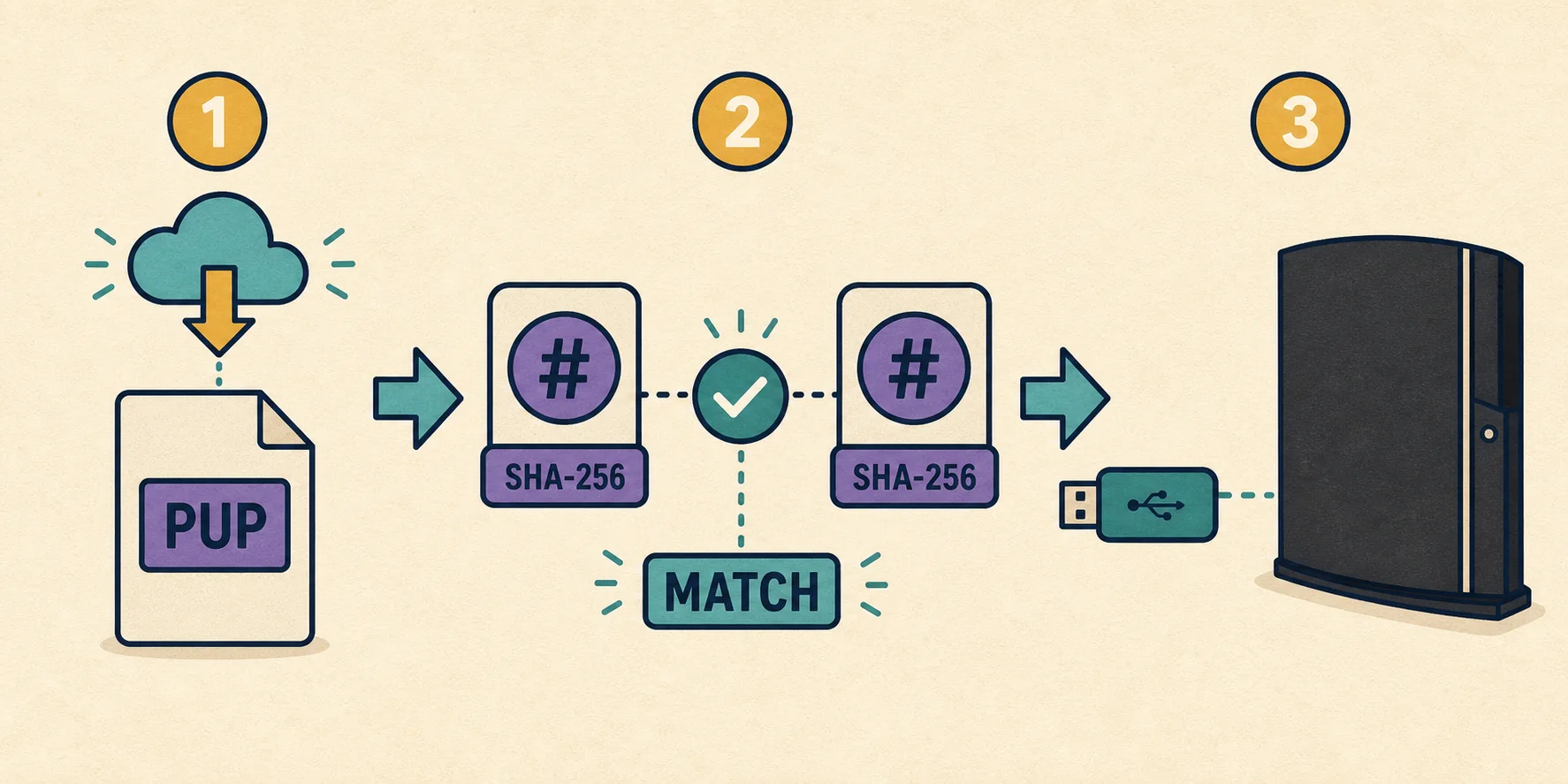
Verify the PS3UPDAT.PUP file before installation
A checksum turns a download claim into a repeatable local test. Run it after the transfer has finished and repeat it on the USB copy when the drive or cable is unreliable.
First confirm that the browser has finished writing the file. Temporary names such as .crdownload or .part should be gone, and the file should not open as an HTML error page. Enable visible extensions in your file manager so PS3UPDAT.PUP.pup, PS3UPDAT.PUP.zip, and a renamed older copy are easy to spot. The console path requires the exact uppercase filename; RPCS3 can browse to a local file, but a clean name still reduces mistakes.
Next compare the exact byte count with 206,197,916. A value such as 196 MB is only a rounded display and cannot distinguish the verified package from an incomplete transfer. If the size is different, download again from the official source instead of extracting, renaming, or trusting a mirror. A matching filename does not repair missing bytes.
Finally calculate SHA-256. The complete file must produce the 64-character value in the facts table. Hashes are case-insensitive when displayed, but every hexadecimal character must match. The command reads the local file and does not upload it or change it. Keep a note of the result when several firmware versions are stored on the same computer.
- 1
Finish the transfer
Wait for temporary extensions to disappear, save the file locally, and do not start an update while the browser is still writing it.
- 2
Check the full filename
Confirm that the file is exactly PS3UPDAT.PUP, not a ZIP archive, a duplicate extension, or an HTML response saved with a misleading name.
- 3
Compare exact bytes
The verified US package is 206,197,916 bytes. A smaller or different file needs a fresh download and source check.
- 4
Calculate SHA-256
Compare the local result with 158471fd834f8ea8036136b6aab43cd86c7ba73d79ca30e0af3c0fe0001cf365 before installation.
- 5
Verify the destination copy
If you move the file to removable media, hash the copy again when the drive, cable, or transfer history is uncertain.
Install the download on a physical PS3
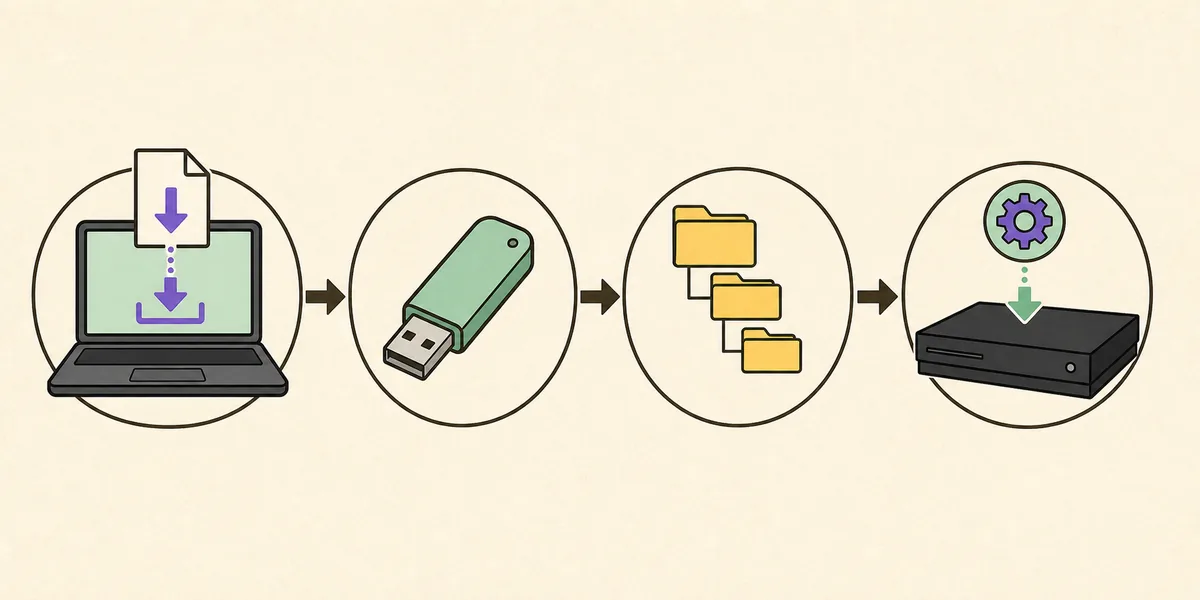
The normal offline route uses compatible FAT32 media and a precise folder hierarchy. The same verified package can also be installed through the console's internet or Safe Mode options.
Prepare the USB drive as FAT32 and prefer an MBR partition map for broad PS3 compatibility. Connect it directly to the console while testing detection. At the root of the drive create a folder named PS3, then create UPDATE inside it. Copy the verified package into UPDATE so the final path is PS3/UPDATE/PS3UPDAT.PUP. Do not nest PS3 inside Downloads or a backup folder, and do not leave the file compressed.
On the XMB, open Settings > System Update and choose Update via Storage Media. Follow the on-screen checks and keep the console powered without interruption. The update needs at least 200 MB of free space, separate from the file's exact 196.65 MiB size. More free space is preferable when the console reports storage problems or has a nearly full drive.
If the normal menu cannot start, use Safe Mode only after checking the source, checksum, USB format, and folder path. Safe Mode changes the recovery context; it does not make an incomplete PUP valid. Read the dedicated installation and Safe Mode guides before choosing restore or format options that can remove user data.
- 1
Prepare the drive
Use FAT32 media with an MBR layout when possible, and connect it directly rather than through a hub.
- 2
Create the folders
At the drive root create PS3, then UPDATE inside it. Capitalization and placement matter for console detection.
- 3
Copy the verified PUP
Place PS3UPDAT.PUP in PS3/UPDATE and confirm the copy has the expected size and hash.
- 4
Start the update
Choose Settings > System Update > Update via Storage Media and keep stable power until the process completes.
Fix common PS3 firmware download problems
Use the symptom to choose the least destructive check. A verified file removes one uncertainty but cannot repair failing storage or unsupported console state.
When a browser download stops early, compare the saved byte count and hash before trying the console. A zero-byte response, a file much smaller than 206,197,916 bytes, or an HTML error page means the transfer did not produce a usable package. Delete the incomplete copy and use the official source again. Do not rename a partial file to make it appear complete.
When a PS3 reports no applicable update data, check FAT32, MBR, the root-level PS3/UPDATE folders, the exact filename, the USB port, and the checksum in that order. A correct folder cannot compensate for a corrupt PUP, and Safe Mode cannot compensate for a missing file. If the copy on USB hashes differently from the computer copy, replace or reformat the drive before retrying.
- A different filename does not prove a different or newer firmware version.
- A rounded 196 MB display is not a substitute for the exact byte count.
- A matching computer hash does not prove that a damaged USB copy matches.
- An official OFW file does not guarantee compatibility with every modified console.
- A PUP is not a BIOS, game ISO, PKG installer, license, or emulator update.
- Repeated power cycling can make an update problem harder to diagnose; record the exact message first.
If the verified file still fails, record the exact error code, percentage, console model, storage symptoms, and current software state before changing another variable.